
Formulating just got smarter.
In this release, we’ve tackled bugs, polished workflows, and introduced some powerful new features to make your experience smoother and more intuitive. Let’s dive in!
New Features Delivered
-
Visualize it all (your data).
Scattered data slows you down. Hunting through files, cross-referencing results, or worse—missing a critical data point—can hold back your progress and even cost you opportunities.
Now, the Visualize Data section brings everything together. Historical results, new test outcomes, and even upload details—like filenames, dates, and uploader names—are all consolidated into one central place. No more guesswork, no more digging.
With everything neatly organized, you can track data like a pro and even download it all as a CSV for deeper analysis.
Say goodbye to fragmented workflows and hello to smarter, faster decision-making. With all your data in one place, you’ll never miss a beat.
-
Feedback is now mandatory (but friendly).
Thumbs up? Thumbs down? Your feedback fuels Luna’s ability to provide better recommendations. But let’s be honest—sometimes, giving feedback can slip through the cracks.
Now, the system makes feedback an essential part of the process. A gentle nudge ensures you provide input before moving forward, so every formulation helps Luna learn and improve.
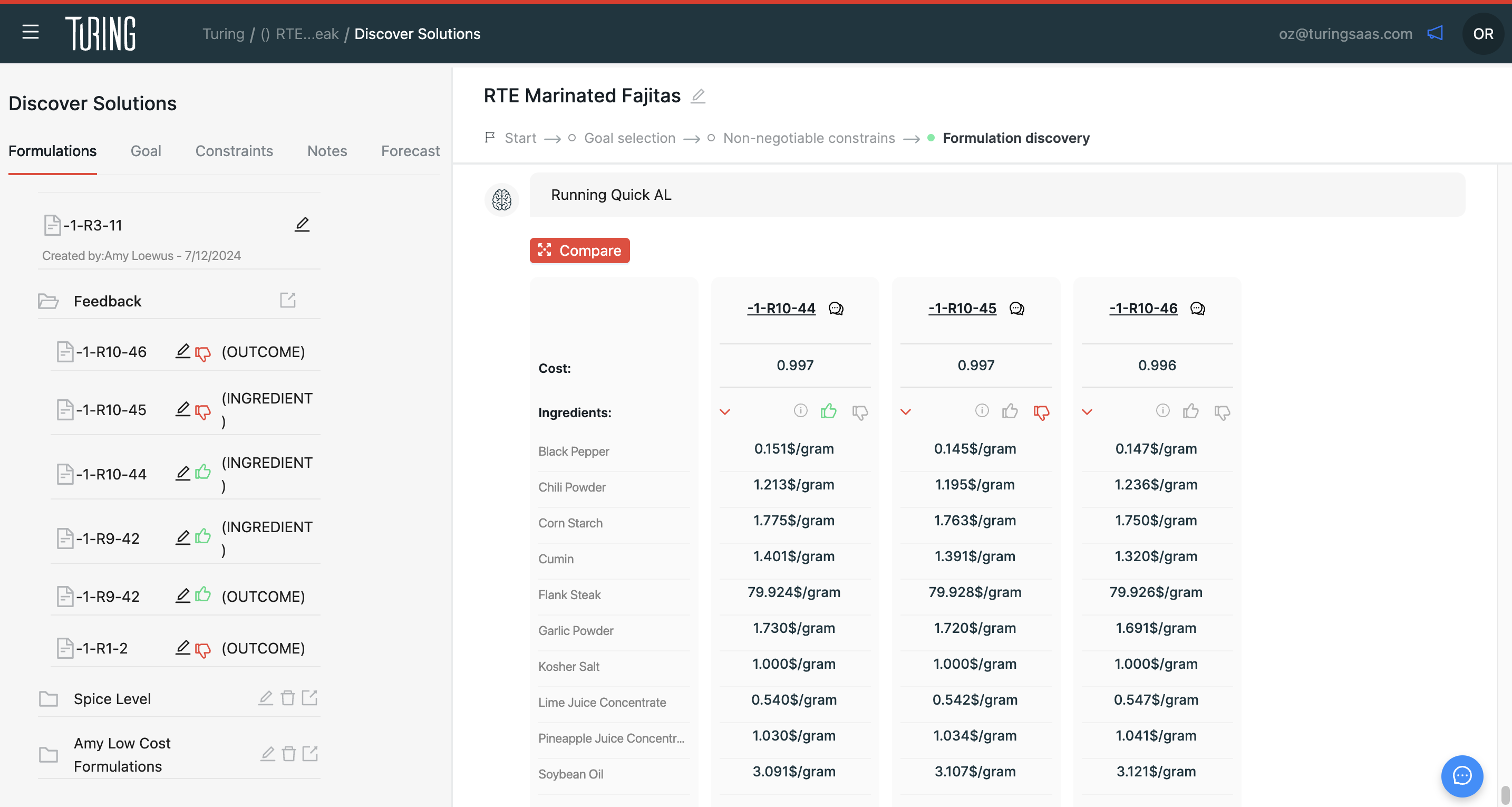
But that’s not all. In the Formulations tab within Discover Solutions, we’ve added a dedicated folder where you can see every formulation you’ve given feedback on. Want to dive deeper? Compare those formulations side by side for richer insights.
This centralized view gives you a continuous representation of your feedback, putting everything you’ve contributed in one place.
-
Soft delete: Clean your slate, not your data.
When working in an exploratory tool, not every initiative or formulation will make the cut. Over time, your screen can become cluttered with projects that no longer matter, making it harder to focus on what does.
Enter soft delete. You can now remove initiatives or formulations from view while keeping the historical test results intact. This gives you the flexibility to tidy up your workspace without losing valuable data.
With this new level of control, your screen stays clear, your focus stays sharp, and your attention stays where it should—on the work that matters most.
Improvements Added
-
Better uploads, better data.
You work hard to run those tests, so it’d be a shame if a missing outcome value slipped through the cracks, leaving Luna with incomplete learnings about your product.
Now, the system catches missing outcomes during uploads, ensuring that every piece of data you provide strengthens the model.
With cleaner uploads, Luna can better understand your product—helping you achieve your goals faster.
Bug Fixes
-
See your updates—instantly.
Ever wondered why your project listing didn’t reflect your latest model rebuild? So did we. The "Updated" column now tracks model rebuilds as expected. For older projects, you’ll need to refresh them manually, but moving forward, everything is synced and clear.
No more second-guessing which version you’re working with. Stay up-to-date, always.
-
No more disappearing acts.
Opening the project details page only to find blank screens is not the best way to start your workflow. We’ve solved this issue, so your project details now appear reliably every time.
-
Error messages that actually help.
When the “Unexpected Error” pops up as you are trying to find formulations for your scenario, it feels more like a dead end than a clue. It’s unhelpful, confusing, and slows you down.
Now, error messages actually guide you. Instead of vague warnings, you’ll see messages like, “Cost objectives are infeasible. Minimum feasible cost is $0.61.”
No more guessing games—just the information you need to fix the issue and keep moving forward.
-
Track every move.
Formulators need to know why the system recommends what it does—but when constraint changes go untracked, understanding those recommendations could be challenging.
Now, every change to constraints, goals, and outcomes is recorded in the history tab. You can see exactly when something was updated and by whom.
Say goodbay to data blindspots! Just complete traceability to keep you informed.
-
Keep your inputs where you left them.
Switching screens used to reset cost constraints, forcing you to start over or leaving you confused.
Not anymore. Your inputs now stay locked in, no matter where you go.
Less rework, more progress.
-
Precision you can count on.
Uploading lab test results should be straightforward—test your recommendations, annotate the outcomes, and let the system detect any changes. But here’s the issue: the system flagged ingredient changes even when none were made, leading to unnecessary confusion.
We’ve fixed this. The system now accurately identifies when ingredients have been modified and ignores unchanged values during uploads.
So much for false alarms that leave you confused.
These changes are designed to save you time, reduce frustration, and keep your formulations on track. Let us know what you think!